

Architecture
DBeaver Team Edition requires a central server deployment and has two client applications. The web client runs in a browser and supports initial setup and centralized administration. The desktop client is installed locally for advanced database work. You can use the web client on its own, or use both clients when an administrator enables desktop connections.
Deploy the server in a private network or in the cloud using Docker or Kubernetes. Both clients connect to the server for Team Edition resources, but their database connection paths differ. The web client connects to databases through the server. The desktop client connects either directly or through DBeaver Database Tunnel.
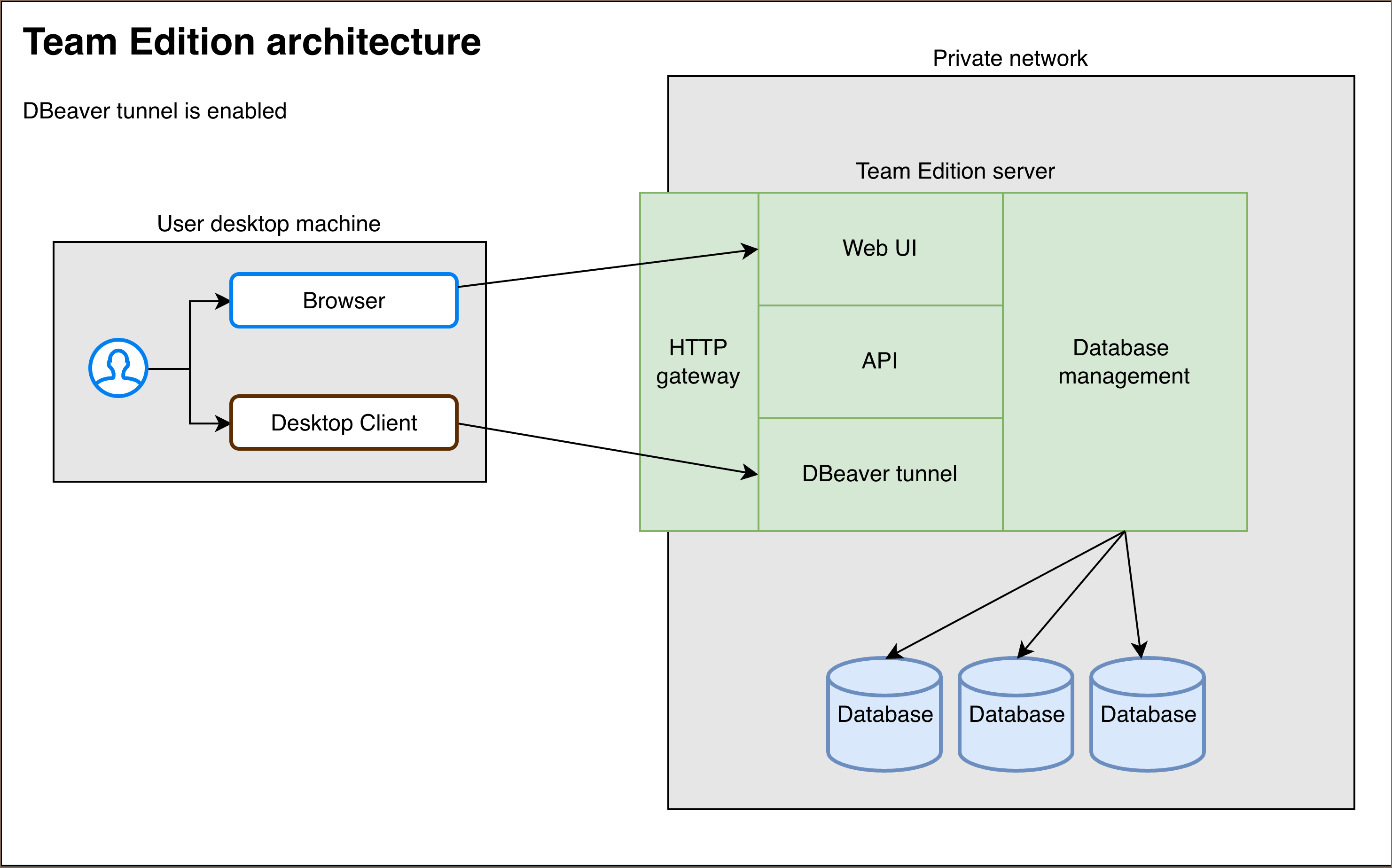
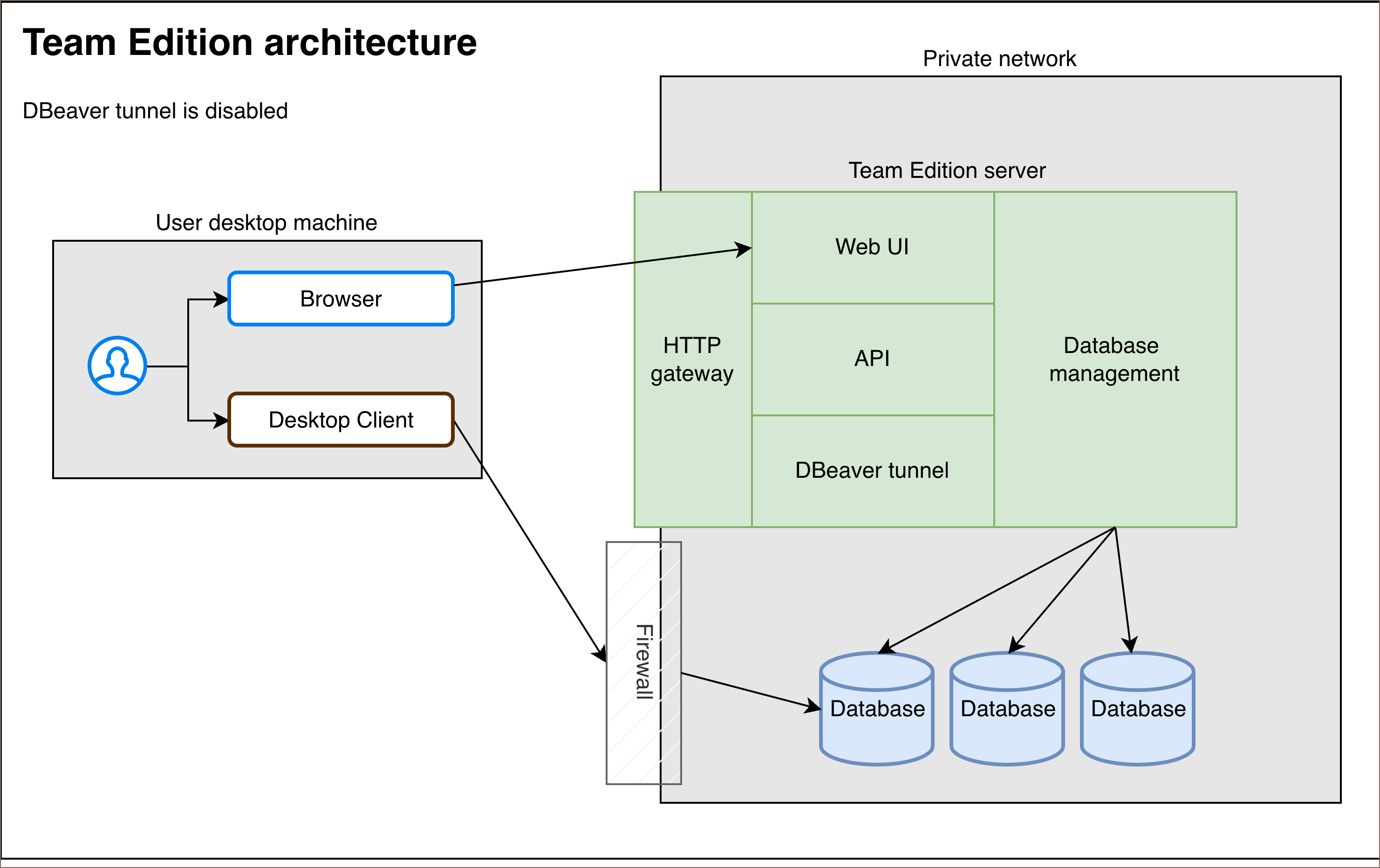
Database access works differently depending on whether DBeaver tunnel is enabled:
The desktop client routes database traffic through the Team Edition server. The database must be reachable from the server.
The desktop client connects to databases directly through the firewall. The web client still connects through the Team Edition server.
The architecture includes three main parts:
-
Team Edition cluster: The Team Edition cluster is the core of the Team Edition architecture. It manages all key functions, such as user authentication, project management, and access control. Deployed within a closed network or in the cloud, the cluster gives organizations complete control over their data and infrastructure.
Info
For more information on deployment, see Team Edition deployment guide.
Besides these core functions, the cluster has an HTTP gateway that helps manage web traffic. The gateway takes all incoming user requests, like those using the Team Edition web interface. It then sends these requests to the right components in the Team Edition cluster.
-
Desktop and web clients:
- Desktop: A full-featured desktop application used for advanced database management.
- Web: A browser-based client used for database access, initial setup, and centralized administration.
-
License and Domain managers:
- License manager: Manages product licenses, allowing administrators to update or modify licenses through a central cluster.
- Domain Manager: Simplifies the process of configuring HTTPS certificates and domain for accessing the Team Edition cluster.
Note
The License manager and Domain manager are optional services and are not included in the deployment.
The following sections provide a detailed overview of each part:
Team Edition cluster
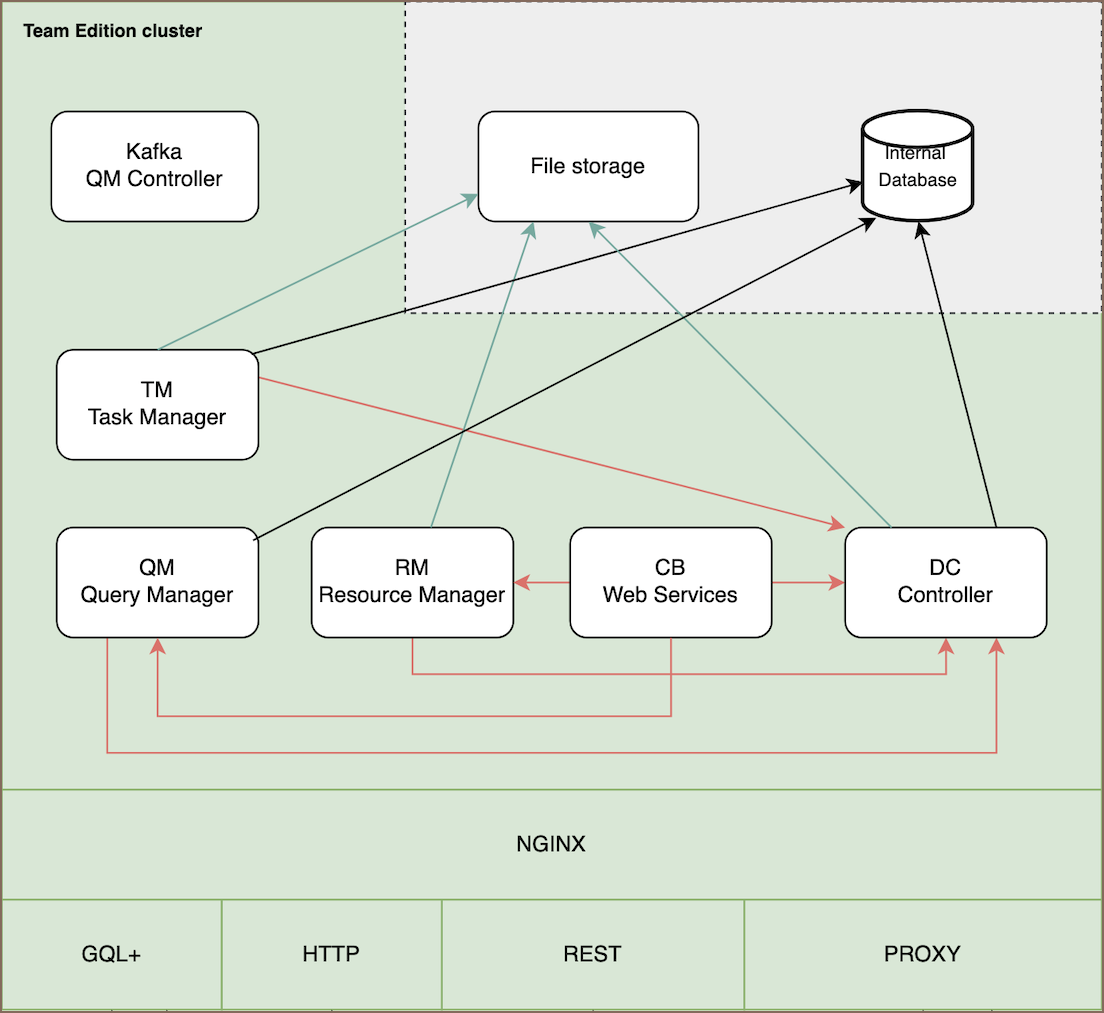
The Team Edition cluster uses containerized microservices orchestrated with Docker or Kubernetes. The cluster divides the services into separate services:
Internal services
- Domain controller (DC): Handles authentication and authorization. To learn more, see Authentication methods and Roles in Team Edition.
- Task manager (TM): Manages tasks and scheduled operations, such as data exports or backups.
- Query manager (QM): Tracks and stores the history of all queries executed by users.
- Resource manager (RM): Handles shared resources, including scripts and connection configurations, storing this data in the internal database.
- CB Web Services: Provides web-based interfaces and API access for managing the Team Edition.
Info
Domain controller, Task manager, and Query manager are isolated from external access.
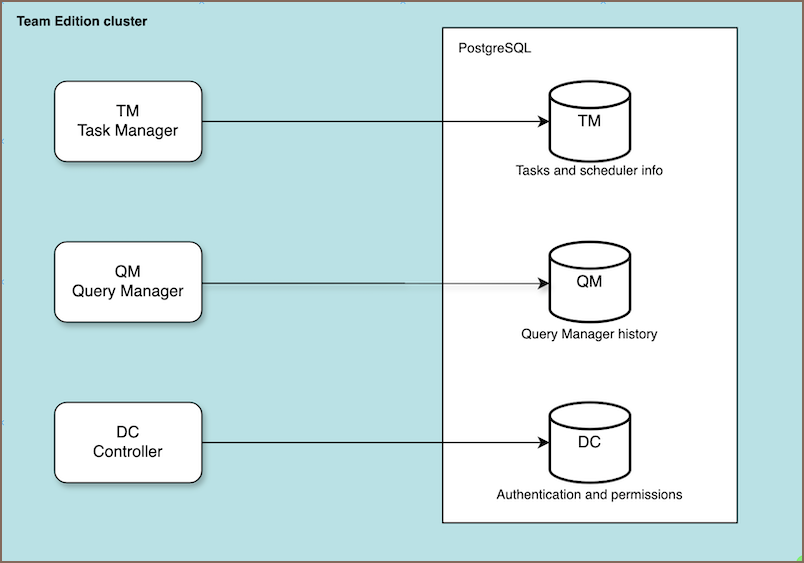
They all use a centralized PostgreSQL database to store their respective data: - Task manager: Uses the TM scheme to store task scheduling and related information. - Query manager: Logs query history in the QM scheme. - Domain controller: Stores authentication data, such as user credentials and role assignments, in the DC scheme.
Data storage
- Internal database: Stores authentication details, user profiles, query history, task schedules, and other system data in the PostgreSQL database. You can change it to an external PostgreSQL, Oracle, MySQL database, or managed database (e.g., RDS).
- File storage: A Linux or cloud-based file system where project resources, including scripts, configurations, and diagrams, are stored.
Info
File storage uses Docker volumes, which are deployed on the host machine or within other virtual file systems (VFS), such as Kubernetes.
Communication and synchronization
-
Kafka Queue Manager (QM) Controller: Handles asynchronous communication between services within the cluster. It propagates events, such as updates to shared resources, allowing changes to be reflected in real-time for all users. Kafka manages tasks like notifying users when scripts are updated by others or when actions are completed.
Note
Kafka is stateless, and its data is cleared after a restart.
-
HTTP gateway: Acts as the main entry point for all external requests in the Team Edition cluster. It handles incoming
GraphQL,HTTP,REST, andproxyrequests from both web and desktop clients.
The gateway leverages NGINX to manage traffic efficiently. NGINX balances the load, ensuring that requests are distributed across services to maintain performance and availability. It works as a reverse proxy, routing incoming client requests to the appropriate internal services.
Desktop and web clients
Both clients work with the central Team Edition server, but each supports a different workflow.
Open the web client in a browser for database work, initial setup, and centralized administration. It doesn't require a local client installation.
Install the desktop client locally for advanced database work. Users can create and manage connections, execute queries, and work with database objects from their local machine. An administrator must enable desktop connections on the server.
License and Domain managers
Team Edition uses external services hosted on DBeaver’s private servers, which are not included in the deployment package. These services are optional and not required for basic operations, allowing the cluster to function independently without internet access.
-
License manager: Verifies and updates licenses for Team Edition. Admins manage license info, like user allocations, through this service, which requires internet access. In offline environments, manual license generation is possible, but internet access is necessary for initial setup or updates.
Note
Temporary internet access is required in fully isolated environments for license verification and updates.
-
Domain Manager: Simplifies HTTPS certificate and custom domain setup. Admins can configure global subdomains (e.g.,
yourcompany.databases.team) or use custom domains. For more details, see Domain Manager.Note
Manual setup is required for domains and certificates in fully isolated environments.
WebSockets
Team Edition uses a persistent WebSocket for real-time events. With a healthy socket, the UI updates live, SSO completes, and background jobs report progress. If the socket is blocked, the UI may look normal but never refresh.
Important
Default deployments already include WebSocket support. For requirements and troubleshooting, see WebSockets.
If WebSockets are not supported by the network, proxy, or firewall, the server falls back to HTTP Long-Polling to deliver updates and task status.