

Connections toolbar
Connections contains various tools on the top toolbar.
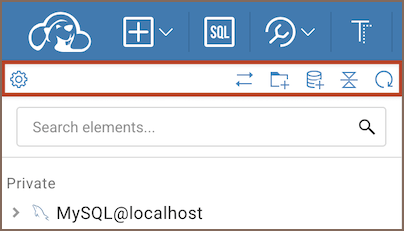
Available tools
| Tool | Icon | Description |
|---|---|---|
| Settings |  |
Opens the settings menu with additional tools. For more information, see Settings menu. |
| Link with editor |  |
Synchronises the active SQL Editor, Data Editor or Metadata Editor with the element in the Connections. It becomes visible when an Editor for a connection is opened. |
| Collapse all |  |
Collapses all expanded objects in the Connections. It becomes visible when at least one object is expanded. |
| New folder |  |
Creates a folder in the Connections tree to group connections. For more information, see Folders in Connections. |
| New Connection |  |
Initiates new connection. For more details, see Create connection. |
| Refresh |  |
Refreshes all objects in the Connections. |