

Database metadata search
Metadata search finds database objects, such as tables, columns, views, procedures, and constraints, by name across one or more connections.
To search database content, select the Search button ( ) on the
main toolbar, or the arrow next to it, then the DB Metadata tab in the Search window.
) on the
main toolbar, or the arrow next to it, then the DB Metadata tab in the Search window.
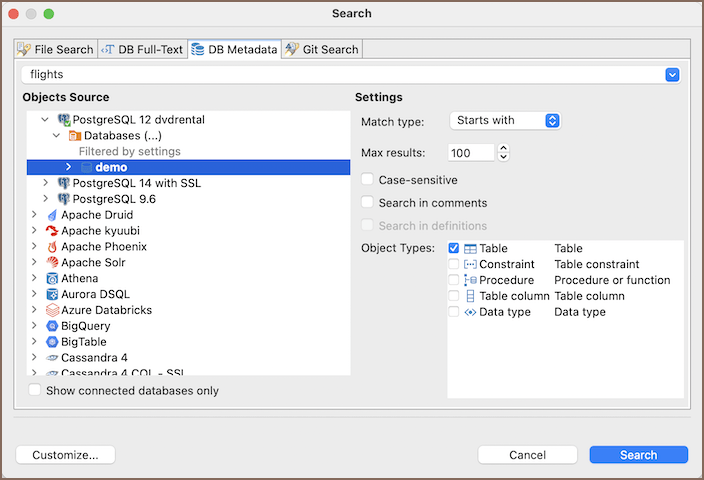
Search settings
Select the connections to search in Objects Source, enter the object name in the Object Name field, and refine the search with these settings:
| Setting | Description |
|---|---|
| Match type | Choose whether your search text must match the start of the name (Starts with), appear anywhere in it (Contains), or match your own pattern with % and _ wildcards (Like) |
| Max results | Set the maximum number of results to display (100 by default) |
| Case-sensitive | Match the exact case of your search text |
| Search in comments | Also search object comments. Available only for object types and connections that support it |
| Search in definitions | Also search object DDL definitions. Available only for object types and connections that support it |
| Object Types | Choose which object types to search. The list depends on the selected connection - for example, table, constraint, procedure, table column, or data type |
Tip
With Match type set to Contains, searching for customer matches customer, customer_orders, and
customer_id.
Select Search. The results open in a Search view:
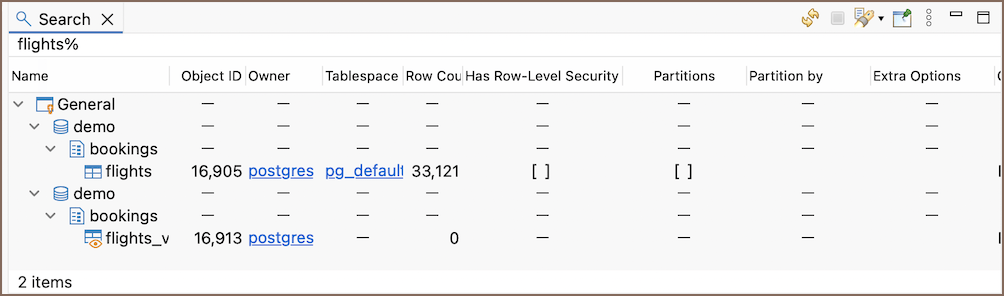
Double-click a row in the Search view to open the object in a dedicated Database Object editor.