

Data read actions
 Since 25.3
This feature is available in Lite, Enterprise, and Ultimate editions only.
Data read actions let you quickly inspect parts of your database. These actions are read-only and safe to use in any environment.
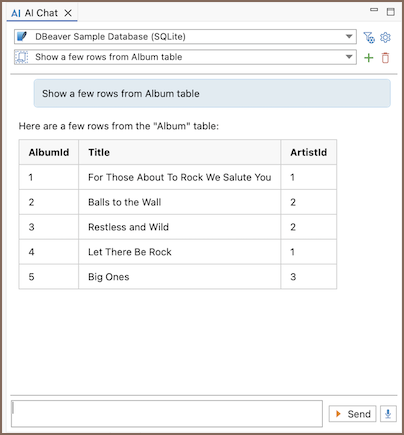
To use the actions:
- Open AI chat on the connection you want to explore
-
Write a prompt that describes what you want to inspect
Note
To use an action, open the Tools & MCP settings, select DBeaver Internal in the tools list, and make sure the Data read category is checked.
-
DBeaver reads a small sample of rows only when AI invokes the enabled Read table sample rows tool.
Tip
Set a scope if you want AI to focus on a specific object.
Available actions
Use it when you want the assistant to understand a table’s structure (for example, columns, typical values, and relationships) so it can generate more accurate SQL, filters, or mappings.
| Action | What it does | What happens | Example |
|---|---|---|---|
| Read table sample rows | Reads a few rows from a table so AI can better understand its structure and generate more accurate SQL or mappings. | - DBeaver reads only a few rows - AI uses this as internal context to improve query generation and mapping - No SQL and no editors are required |
"help me build a join for Album and Artist, use sample rows if needed" |